Wednesday, October 21, 2015

How Do I Flush My Windows DNS Cache?

 How Do I Flush My Windows DNS Cache?

The following guide will walk you through clearing your DNS Cache. Every time you venture onto the Internet, DNS resolutions are being made and your computer stores many of them. Caching these resolutions can speed up your web activities because your computer no longer has to ask another computer where something is located.
Eventually there will come a time when a bad entry is stored. There are generally two ways to remove these entries. First is to allow 24 hours to pass. During this time your computer will seek out and make the necessary DNS updates. Second is to flush your DNS cache.
The first step to flushing your DNS, is to open your “Windows Command” prompt.
§  WinXP: Start, Run and then type “cmd” and press Enter.
§  Window 7: Click “Start” and type the word “Command” in the Start search field. Finally right click the command prompt icon and select the option to “Run as Administrator”.

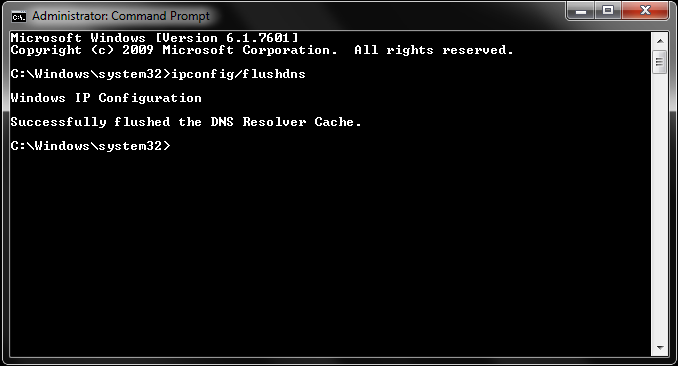
§  In the open prompt, type “ipconfig /flushdns” (without the quotes).
§  You should receive a message of your success as confirmation when the cache is cleared.
 Flushing the cache removes all the information stored within the cache, forcing the computer to find new DNS information.


10 Things To Know About The Best And Worst Times To Drink Water Every Day

10 Things To Know About The Best And Worst Times To Drink Water Every Day


 ‘8 glasses of water a day’ is a phrase that we’ve all been hearing since childhood. Most of us don’t follow it however, drinking water only when we feel like it. This is a huge mistake, because drinking plenty of water does wonders for your body. It makes your hair shine, keeps your skin firm, helps you lose weight, improves your digestion, prevents fatigue and even gives your brain a boost. So, now that we’ve sold you on the why, let’s get down to the how.
Here’s how you should be spreading out your water intake throughout the day. 


1. Drink 1 to 2 glasses as soon as you wake up to get your system going.


This will clear all the toxins out of your system, and get your organs moving. You can add flavours like lemon, honey and cinnamon to the water if you like, to boost its health quotient.  


2. Drink 1 glass of water half an hour before your meal to boost weight loss.

This will dull the edge of your hunger so that you eat a little less at meal time. It also prepares your stomach for the food that is to come. 


3. Don’t drink water during or immediately before or after your meal, as it dilutes digestive juices.

Avoid drinking water half an hour before your meal, during your meal, and one hour after your meal. It dilutes your digestive juices, making them much less effective.


4. Substitute water during meals with yoghurt, buttermilk (chaas) or raita. 

If you get thirsty during your meal, instead of drinking water, have some yoghurt orraita instead. It has the same cooling effect on your body, but does not hamper your digestion. Buttermilk (chaas) is another great option! 


5. Drink water when you feel hungry to prevent needless snacking.

The body’s signals for hunger are very similar to those for thirst, so the first thing you should do when you feel hungry is drink some water. Wait for about 10 minutes, and if you’re still hungry then go ahead and have a snack by all means, but you may just find that your hunger pang has miraculously vanished.

6. Drink a glass of water when you feel tired to power up your brain.

Since 75% of your brain consists of water, drinking water helps it function better. Drink a glass of water if you’re feeling tired at work, or if you have a big presentation coming up and need to focus. 


7. Drink more water in the first half of the day than the second half to prevent middle of the night bathroom trips.

Drinking too much water in the second half of the day will ensure that you keep waking up at night to use the loo. Instead, drink more water in the first half, and then slow down your consumption in the second half.


8. Drink more water during the day if you know you’re going to get less sleep that night.

Your body carries out all its repair and renovation while you’re asleep, and it can transport nutrients around much better and faster if you’re well hydrated. Therefore, if you know you’re going to get less sleep that night, drink extra water during the day – it’ll help you feel a little more rested the next morning.  


9. Drink plenty of water before and after you exercise to power up your muscles.

It’s important that you’re hydrated when you exercise, because your body needs to transport necessary nutrients to your muscles. On days that you know you’re going to be working out, drink plenty of water before you start, and then after you’re done. Water also prevents tiredness – you’ll get tired much faster on a day that you’re dehydrated than when you’re properly hydrated.


10. Drink a little extra water if you’re ill, or if you’re pregnant or breastfeeding.


Drinking water when you’re sick will help your body repair itself faster. Pregnant and breastfeeding women require a little more water than usual – about 10 glasses per day is recommended. 

Myths about 10 ‘healthy foods' busted

Myths about 10 ‘healthy foods' busted


Most of us, in a bid to eat healthy and stay fit head straight to the "Health" or the "Diet food" section of supermarkets. 

These products, which are heavy on the pocket promise to be really light in calories. But have you ever tried to read the food labels to understand if they are really healthy or is it just another marketing gimmick? Sheryl Salis, a senior registered nutritionist, naturopath, certified diabetes educator and wellness coach busts some of the common myths associated with popular health products.

Sugar-free chocolates
"We often hear people say "I am a diabetic, therefore, I only buy sugar free products". I have come across many people who eat an entire bar of chocolate thinking it is sugar free. Beware! The sugar free market is booming thanks to our ignorance", points Sheryl. Do not fall prey to the sugar free scam assuming it won't affect your blood sugar levels. 'Sugar free' does not mean carb, calorie or fat free. When manufacturers remove sugar, they often add fat to the product making it higher in fat content than the product with sugar. Why eat the nasty sugar free cookies when you can have the good ones with less carbs in it. It is advisable to check the food label on the product for the total carbohydrate and fat content before consuming it.

For eg: if you look at the food label above, there is hardly any difference in the carb content in both the products but the saturated fat content in the sugar free product is more than that with sugar.

Brown bread
Those of us watching our waistlines choose brown breads over white breads thinking we are making a smart eating choice. Beware!

"The truth is that the so called brown bread may not necessarily be made with whole wheat flour or whole grain. Some manufacturers add caramel colour to the dough to give the brown colour to bread. The soft texture of the brown bread is maintained by adding 3/4th refined flour (maida) to 1/4th wheat flour. So it is actually white bread in disguise," informs Sheryl.

To ensure that you are buying the most nutritious bread option, read labels and check to see that the first ingredient listed is either whole wheat or whole meal flour and there is no caramel colouring mentioned on the label. Choose breads labelled as "whole wheat, multigrain, 7 grain, 5 grain or high fibre".

An easy way to check for the authenticity of brown bread is to hold it and see if it crumbles under pressure. If it is white bread, it will not crumble easily because of its sticky consistency.

Multigrain high fiber biscuits
When we are struck with hunger pangs in between meals or for some of us as soon as we wake up with our morning cup of tea, we often reach out for the biscuits labeled "multigrain /high fiber" and finish almost the entire packet in a jiffy assuming it's a healthier option...Think again!..Biscuits, even the low sugar, high fiber variety are not very healthy and not the best option when it comes to snacking. To make the biscuits crunchy and crispy, manufacturers add fats and sugar.

It is ironic that when hunger pangs strike in-between meals, we reach out for the biscuit jar thinking of it as a healthier alternative to other snacks. In reality, most biscuits are not very healthy, and this includes the high-fiber, low-sugar variety as well. Surprised? Well then, you must not forget that while some biscuits may have low-sugar, they still contain a large amount of unhealthy fat, without which they can't be crispy and crunchy as we enjoy them. These fats can increase the risk of diabetes, heart disease and sudden cardiac death. Skip the biscuits and munch on khakra or roasted chana for a satisfying mid-day meal instead.

Fat free cereals
In today's modern times due to paucity of time and busy lifestyles, breakfast cereals are gaining immense popularity. Manufacturers are marketing them as low fat meal replacers asking us to replace two of our traditional home cooked meals with these highly processed cereals loaded with additives. In our fight against our bulging waistlines, we fall prey to these the tall claims in a bid to achieve quick weight loss.

Usually products marked as low fat or fat free can be misleading as they may be high on the sugar content. In order for the fat-free food to maintain its taste, the fat has to be replaced by either sodium, sugar, or something else that will give it a similar flavour and texture. For example, if you have a look at the list of ingredients mentioned on the cereal packet, it has honey, malt extract and sugar (8.4 gms in 30 gms cereal) making the product problematically high in simple carbs/sugar. This means you are consuming sugar coated cereal which can induce increased appetite and be detrimental to your sugars. Studies have shown that the body utilizes more energy metabolizing a meal from less-processed foods than highly processed foods, which means lesser calories leftover for the body to store as fat.

Light/ Lite butter
Some years ago, the use of lite butter surged in popularity as people began to understand the dangers of cholesterol and saturated fat present in regular butter. There is no debate over which one is a healthy option. Lite butter is definitely better than regular butter as it is cholesterol free. Lite butter is made from vegetable oil whereas regular butter is made from cow's milk. One word of caution here is; even though lite butter is cholesterol free, it is not fat free. It has saturated fat and sodium which puts you at a risk of heart disease if not taken in moderation. Our human tendency is to go overboard with the quantity when we know it's a healthy option. Moreover some margarines available have transfats which are harmful. Suggest you read food labels carefully and look for total fat, sodium and transfat.

Remember, whichever product you select, limit your overall consumption. Do not overdo even if it's healthy - portion control is the key.

Nutrition /Energy bars
In today's "on the run" busy times, energy bars are fast becoming a rage especially with athletes, health conscious people, workaholics or busy moms all opting for these as a quick nutritional fix. They are being marketed well under the guise of convenience and good nutrition. Most of us ditch our regular snacks like fruit, yoghurt or muesli and turn to these sophisticated energy or "power'' bars.

Watch out! Have a good look on the food label of the wrapper before you make a choice. Many of these are simply enhanced sweets with as much sugar, saturated fat and calories as a snicker bar. Generally, if bars are labeled "low carbs" they may also be low in fiber and high in fat especially saturated fat. And if a bar tastes good, it probably has at least 12 grams of sugars per serving. You have to decide, what means most to you - taste, fat, fiber, protein or sugars.

Being heavy on the pocket , these bars are also small and compact in size leaving you unsatisfied and hungry for some more (one may not be enough). There are different types of bars available in the market today. There are high-carbohydrate bars, protein bars, energy bars, breakfast bars, brain-boosting bars, meal-replacement bars, diet bars, and women-only bars. To complicate matters, you may not be able to judge every bar by its wrapper. In October 2001, when ConsumerLab.com announced the findings of its independent laboratory tests of 30 nutrition bars, 18 did not meet the claims of ingredient levels on the label. More than any other misrepresentation, about one-half of the nutrition bars exceeded the carbohydrate levels stated on the wrapper (one bar promoted as a low-carbohydrate diet product claimed it had just 2 grams of carbohydrates, but testing showed it actually contained 22 grams).

When choosing bars, keep the following points in mind:

-less than 200 calories
-less than 5 gms of fat
-at least five grams of fibre
-And more than 15gms of protein

Diet foods
Here comes another popular fad- roasted/baked or diet snacks. We see an entire section dedicated to these roasted/diet snacks on the shelves of supermarkets and we mindlessly head straight to that section picking up stuff for our guilt free snacking.

And to make matters worse, most of us end up finishing almost the entire packet sitting in front of the television thinking it's healthy. Think again...roasted does not mean its calorie free. There are two options available "low fat" or "fat free". The low fat version is the one which is deep fried but the oil is drained out and the fat free is where there use refined edible oil to spray seasonings and enhance flavor. One quick exercise you could do is crush some in a blotting paper and see if it stains with oil. So, go slow on these fat free snacks which can jeopardize both your health and wealth as they are prized high. Most of us fall prey to the tall claims made on the front of the package without reading the nutrition label on the back. Look out for "partially hydrogenated vegetable oil" listed among the top three ingredients on the label. This could have Trans fats which are harmful for health. You will also be able to tell, by looking at the label what the company calls a portion of that food. Prepare to be amazed: What they say is a serving and what you actually eat may be completely different. The Nutrition Information label lists the calories; grams of fat, saturated fat and Trans fat; and, sometimes, grams of sugar. So if the label says a serving is a serving of chips and you eat 2 or 3 servings, double or triple the nutrition information numbers.

Flavoured yoghurt
Most flavoured yogurts which come in a variety of mouth watering flavours don't contain the real fruit but have added fruit concentrate, making it high in its sugar content. They are often marketed as health foods and are surely better than if not the best when compared to the other processed foods available in the market.

People who have blood sugar problems could experience a sudden increase in sugar levels with flavoured yogurt. Read the nutrition label at the back of the flavoured yogurt content and avoid if it contains alternative sugars like fructose, glucose, sucrose as they are not healthy.

If you compare the nutrition label of regular yogurt and flavoured yogurt, you will see that 150 gms of regular yoghurt gives you approx 81 calories with no added sugar whereas 150 gms of flavoured yoghurt gives you 130 calories with 20 grams of added sugar alone contributing 80 calories. Sugar provides instant energy and no nutrition.

Even the frozen yoghurts which are now fast replacing the desserts with their "healthy tag" are a suspect. Flavoured versions of yoghurt contain more sugar (by virtue of added flavour) in the form of canned fruits, syrups containing HFCS (High Fructose Cane Sugar),) and synthetic flavouring than plain versions. You can swap the flavoured yoghurt with Greek yoghurt/low fat yoghurt and mix it with sum freshly chopped seasonal fruits (not canned fruits)

Ready to eat foods
A boon to today's working women and yes some men too who are looking for some quick and easy convenience food. You get almost everything from ready to eat idlis, dosas, upmas, dal makhani, noodles, soups, paneer palak etc. It's instant! Heat the contents in a micro for three minutes and its ready to eat.

While all this looks really good and convenient, is it really healthy? Read the food label carefully. The manufacturers need to add fat and sodium to increase the shelf life of the product. And that's why if you have a look at the food label above, it is loaded with sodium. If you eat 100 gms of ready to eat upma, it gives you 1300 mg of sodium which is your requirement for the entire day. We all need some sodium, but most of us eat about 3400 mg per day. This is more than double the amount of sodium we need. Healthy adults need only 1500 mg of sodium per day. Healthy children need only 1000-1500 mg of sodium per day.

Choose low sodium foods. When reading food labels, low sodium is defined as 140 mg of sodium per serving.

Cholesterol free oil
This is one of my favourites. My overweight clients always try to justify the excess oil consumption by telling me that they are using cholesterol free oil or the more expensive olive oil. Often hear people say "we use only olive oil" or "But I use only cholesterol free oil for frying, then why are my cholesterol levels high?" Most of us are slaves to our tongues and love tasty food. And if we have cooks, the matter just gets worse. They have no control on the oil consumption; their only goal is to serve you tasty food.

Remember all vegetable oils are free of cholesterol. Cholesterol is only present in non veg foods like meat, fish, eggs, butter, milk and milk products. It is a great marketing gimmick of the manufacturers to boost sales. Remember quantity is important. One gm of any oil gives you 9 calories. Oils are calorie dense and hence we need to use them in portioned amounts.

Keep this in mind when choosing oils "heart-friendly oil should be cholesterol- and trans-fat free, low in saturated fats and high in monounsaturated fat (MUFA) and polyunsaturated fat (PUFA), it should have an ideal omega 6 to omega 3 acids ratio and a high smoking point". Speak to your nutritionist who will guide you on which oil is best for you.

Vegetable Names (Telugu to English)

Vegetable Names (Telugu to English)
Telugu Name
English Name
Yendu mirapa kaaya
Red Chilli
Chukka koora
Red sorrel
Puttagodugulu
Mushroom
Vellulli
Garlic
Usirikaaya
Goose Berry
pudina Akulu
 Mint Leaves
Kobbari Kaaya
Coconut
Maamidi Kaaya
Raw Mango
Mokkajonna
Corn
Bhatani
Green Peas
Bangalore Mirchi
Capsicum
Chikkudu Kaya
Broad beans
Beetroot
Beetroot
Cabage
Cabage
Califlower/Gobi
Califlower
Arati Kaaya
Raw banana
Tamata
Tomato
Chema Dumpa
Colacasia
Pachi Mirapa Kaya
Green Chilli
Boodidhi Gummadi kaaya
Ash gourd
Kothimeera
Coriander
Menthi Kura
FenuGreek Leaves
Gongura
Sorrel
Karivepaku
Curry Leaves
Paalakura
Spinach
Bachalikura
Chinese spinach
Thotakura
Amaranthus
Mulakkaaya
Drumstick
Chilakada Dumpa
Sweet Potato
Panasa kaaya  
Raw Jack fruit
Dosakaya
Cucumber
Mullangi
Radish
Bendakaya
lady's-finger, okra
Goru chikkudu
Cluster beans
Dondakaya
Tindoora
Anapakaya/Sorakaya --
Bottle Gourd
Potlakaya
Snake Gourd
Beerakaya
Ridge Gourd
Kakarkaya
Bitter Gourd
Vankaya
Brinjal
Alugadda/Bangala dumpa
Potato


Monday, October 12, 2015

How to Defrag a Windows 10 Computer


How to Defrag a Windows 10 Computer

Defragmenting (or “defragging”) a Windows 10 computer arranges fragmented files on the hard drive in a manner that optimizes the amount of disk space and increasing system performance.

When you defragment the hard drive, all fragments of files are moved to contiguous clusters. This makes it easy for Windows to read the files and the computer starts working faster.

On your computer with Windows 10, defragmenting only the system drive (C: ) is sufficient. However, if you experience long load times while accessing the files stored in other partitions of the hard disk, you can defragment them as well.

The process of defragmenting the partitions of a hard disk drive is identical for every partition (volume). Here is how to defrag your computer.

1.Sign in to your Windows 10 computer with an administrator account. It is important to use an administrator account because standard account holders cannot defrag the hard disk drive.

2.Click the Start button.

3.From the left pane of the Start menu, click File Explorer.


4.On the opened window, from the navigation pane in the left, expand the This PC tree.

5.From the expanded list, right-click Local Disk (C: ) or any other partition on which Windows 10 is installed.

6.From the context menu, click Properties.


7.On the opened Local Disk (C: ) Properties box, go to the Tools tab.

8.From the displayed interface, under the Optimize and defragment drive section, click the Optimize button.


9. On the Optimize Drives box, from the displayed list, ensure that the system drive (C: in this example) is selected.


10.Click the Analyze button from below the list.

11. Wait until Windows completes the analysis and displays the percentage of the fragmented files in the selected drive.

Note: If there are no fragmented files in the drive, Windows displays a message box stating that the disk does not need to be defragmented.


12.After Windows completes the analysis, click the Optimize button to start the defragmentation process on the selected volume.


13.Wait until Windows defragments the drive successfully, restart the PC, and start using Windows 10 normally.

50 Most Frequently Used UNIX / Linux Commands With Examples

50 Most Frequently Used UNIX / Linux Commands With Examples

1.tar command
Create a new tar archive.
$ tar cvf archive_name.tar dirname/

 Extract from an existing tar archive.
 $ tar xvf archive_name.tar

View an existing tar archive.
$ tar tvf archive_name.tar


2. grep command
Search for a given string in a file (case in-sensitive search).
$ grep -i "the" demo_file

 Print the matched line, along with the 3 lines after it.
$ grep -A 3 -i "example" demo_text

 Search for a given string in all files recursively
$ grep -r "ramesh" *

3.find command
Find files using file-name ( case in-sensitve find)
$ find -iname "MyCProgram.c"

Execute commands on files found by the find command
$ find -iname "MyCProgram.c" -exec md5sum {} \;

 Find all empty files in home directory
# find ~ -empty


4. ssh command examples
Login to remote host
ssh -l jsmith remotehost.example.com

Debug ssh client
ssh -v -l jsmith remotehost.example.com

Display ssh client version
$ ssh -V
OpenSSH_3.9p1, OpenSSL 0.9.7a Feb 19 2003

5. sed command examples
When you copy a DOS file to Unix, you could find \r\n in the end of each line. This example converts the DOS file format to Unix file format using sed command.
$sed 's/.$//' filename

Print file content in reverse order
$ sed -n '1!G;h;$p' thegeekstuff.txt

Add line number for all non-empty-lines in a file
$ sed '/./=' thegeekstuff.txt | sed 'N; s/\n/ /'

6. awk command examples
Remove duplicate lines using awk
$ awk '!($0 in array) { array[$0]; print }' temp

Print all lines from /etc/passwd that has the same uid and gid
$awk -F ':' '$3==$4' passwd.txt

Print only specific field from a file.
$ awk '{print $2,$5;}' employee.txt

7. vim command examples
Go to the 143rd line of file
$ vim +143 filename.txt

Go to the first match of the specified
$ vim +/search-term filename.txt

Open the file in read only mode.
$ vim -R /etc/passwd

8. diff command examples
Ignore white space while comparing.
# diff -w name_list.txt name_list_new.txt
2c2,3
< John Doe --- > John M Doe
> Jason Bourne

9. sort command examples
Sort a file in ascending order
$ sort names.txt

Sort a file in descending order
$ sort -r names.txt

Sort passwd file by 3rd field.
$ sort -t: -k 3n /etc/passwd | more

10. export command examples
To view oracle related environment variables.
$ export | grep ORACLE
declare -x ORACLE_BASE="/u01/app/oracle"
declare -x ORACLE_HOME="/u01/app/oracle/product/10.2.0"
declare -x ORACLE_SID="med"
declare -x ORACLE_TERM="xterm"

To export an environment variable:
$ export ORACLE_HOME=/u01/app/oracle/product/10.2.0

11. xargs command examples
Copy all images to external hard-drive
# ls *.jpg | xargs -n1 -i cp {} /external-hard-drive/directory

Search all jpg images in the system and archive it.
# find / -name *.jpg -type f -print | xargs tar -cvzf images.tar.gz

Download all the URLs mentioned in the url-list.txt file
# cat url-list.txt | xargs wget –c

12. ls command examples
Display filesize in human readable format (e.g. KB, MB etc.,)
$ ls -lh
-rw-r----- 1 ramesh team-dev 8.9M Jun 12 15:27 arch-linux.txt.gz

Order Files Based on Last Modified Time (In Reverse Order) Using ls -ltr
$ ls -ltr

Visual Classification of Files With Special Characters Using ls -F
$ ls -F

13. pwd command
pwd is Print working directory. What else can be said about the good old pwd who has been printing the current directory name for ages.

14. cd command examples
Use “cd -” to toggle between the last two directories
Use “shopt -s cdspell” to automatically correct mistyped directory names on cd

15. gzip command examples
To create a *.gz compressed file:
$ gzip test.txt

To uncompress a *.gz file:
$ gzip -d test.txt.gz

Display compression ratio of the compressed file using gzip -l
$ gzip -l *.gz

16. bzip2 command examples
To create a *.bz2 compressed file:
$ bzip2 test.txt

To uncompress a *.bz2 file:
bzip2 -d test.txt.bz2

17. unzip command examples
To extract a *.zip compressed file:
$ unzip test.zip

View the contents of *.zip file (Without unzipping it):
$ unzip -l jasper.zip
Archive: jasper.zip
Length Date Time Name
-------- ---- ---- ----
40995 11-30-98 23:50 META-INF/MANIFEST.MF
32169 08-25-98 21:07 classes_
15964 08-25-98 21:07 classes_names
10542 08-25-98 21:07 classes_ncomp

18. shutdown command examples
Shutdown the system and turn the power off immediately.
# shutdown -h now

Shutdown the system after 10 minutes.
# shutdown -h +10

Reboot the system using shutdown command.
# shutdown -r now
Force the filesystem check during reboot.
# shutdown -Fr now

19. ftp command examples
Both ftp and secure ftp (sftp) has similar commands. To connect to a remote server and download multiple files, do the following.
$ ftp IP/hostname
ftp> mget *.html

To view the file names located on the remote server before downloading, mls ftp command as shown below.
ftp> mls *.html -
/ftptest/features.html
/ftptest/index.html
/ftptest/othertools.html
/ftptest/samplereport.html
/ftptest/usage.html

20. crontab command examples
View crontab entry for a specific user
# crontab -u john -l

Schedule a cron job every 10 minutes.
*/10 * * * * /home/ramesh/check-disk-space

21. service command examples
Service command is used to run the system V init scripts. i.e Instead of calling the scripts located in the
/etc/init.d/ directory with their full path, you can use the service command.

Check the status of a service:
# service ssh status

Check the steatus of all the services.
service --status-all

Restart a service.
# service ssh restart

22. ps command examples
ps command is used to display information about the processes that are running in the system.
While there are lot of arguments that could be passed to a ps command, following are some of the common ones.

To view current running processes.
$ ps -ef | more

To view current running processes in a tree structure. H option stands for process hierarchy.
$ ps -efH | more

23. free command examples
This command is used to display the free, used, swap memory available in the system.
Typical free command output. The output is displayed in bytes.
$ free
total used free shared buffers cached
Mem: 3566408 1580220 1986188 0 203988 902960
-/+ buffers/cache: 473272 3093136
Swap: 4000176 0 4000176

If you want to quickly check how many GB of RAM your system has use the -g option. -b option displays in bytes,-k in kilo bytes, -m in mega bytes.
$ free -g
total used free shared buffers cached
Mem: 3 1 1 0 0 0
-/+ buffers/cache: 0 2
Swap: 3 0 3

If you want to see a total memory (including the swap), use the -t switch, which will display a total line as shown below.
$ free -t
Total used free shared buffers cached
Mem: 3566408 1592148 1974260 0 204260 912556
-/+ buffers/cache: 475332 3091076
Swap: 4000176 0 4000176
Total: 7566584 1592148 5974436

24. top command examples
top command displays the top processes in the system ( by default sorted by cpu usage ). To sort top output by any column, Press O (upper-case O) , which will display all the possible columns that you can sort by as shown below.
Current Sort Field: P for window 1:Def
Select sort field via field letter, type any other key to return
a: PID = Process Id v: nDRT = Dirty Pages count
d: UID = User Id y: WCHAN = Sleeping in Function
e: USER = User Name z: Flags = Task Flags
........
To displays only the processes that belong to a particular user use -u option. The following will show only the top processes that belong to oracle user.
$ top -u oracle

25. df command examples
Displays the file system disk space usage. By default df -k displays output in bytes.
$ df -k
Filesystem 1K-blocks Used Available Use% Mounted on
/dev/sda1 29530400 3233104 24797232 12% /
/dev/sda2 120367992 50171596 64082060 44% /home

df -h displays output in human readable form. i.e size will be displayed in GB’s.
ramesh@ramesh-laptop:~$ df -h
Filesystem Size Used Avail Use% Mounted on
/dev/sda1 29G 3.1G 24G 12% /
/dev/sda2 115G 48G 62G 44% /home

Use -T option to display what type of file system.
ramesh@ramesh-laptop:~$ df -T
Filesystem Type 1K-blocks Used Available Use% Mounted on
/dev/sda1 ext4 29530400 3233120 24797216 12% /
/dev/sda2 ext4 120367992 50171596 64082060 44% /home

26. kill command examples
Use kill command to terminate a process. First get the process id using ps -ef command, then use kill -9 to kill the running Linux process as shown below. You can also use killall, pkill, xkill to terminate a unix process.
$ ps -ef | grep vim
ramesh 7243 7222 9 22:43 pts/2 00:00:00 vim
$ kill -9 7243

27. rm command examples
Get confirmation before removing the file.
$ rm -i filename.txt
It is very useful while giving shell metacharacters in the file name argument.

Print the filename and get confirmation before removing the file.
$ rm -i file*

Following example recursively removes all files and directories under the example directory. This also removes the example directory itself.
$ rm -r example

28. cp command examples
Copy file1 to file2 preserving the mode, ownership and timestamp.
$ cp -p file1 file2

Copy file1 to file2. if file2 exists prompt for confirmation before overwritting it.
$ cp -i file1 file2

29. mv command examples
Rename file1 to file2. if file2 exists prompt for confirmation before overwritting it.
$ mv -i file1 file2
Note: mv -f is just the opposite, which will overwrite file2 without prompting.
mv -v will print what is happening during file rename, which is useful while specifying shell metacharacters in the file name argument.
$ mv -v file1 file2

30. cat command examples
You can view multiple files at the same time. Following example prints the content of file1 followed by file2 to stdout.
$ cat file1 file2

While displaying the file, following cat -n command will prepend the line number to each line of the output.
$ cat -n /etc/logrotate.conf
1 /var/log/btmp {
2 missingok
3 monthly
4 create 0660 root utmp
5 rotate 1
6 }

31. mount command examples
To mount a file system, you should first create a directory and mount it as shown below.
# mkdir /u01
# mount /dev/sdb1 /u01

You can also add this to the fstab for automatic mounting. i.e Anytime system is restarted, the filesystem will be mounted.
/dev/sdb1 /u01 ext2 defaults 0 2
32. chmod command examples
chmod command is used to change the permissions for a file or directory.
Give full access to user and group (i.e read, write and execute ) on a specific file.
$ chmod ug+rwx file.txt

Revoke all access for the group (i.e read, write and execute ) on a specific file.
$ chmod g-rwx file.txt

Apply the file permissions recursively to all the files in the sub-directories.
$ chmod -R ug+rwx file.txt

33. chown command examples
chown command is used to change the owner and group of a file.
To change owner to oracle and group to db on a file. i.e Change both owner and group at the same time.
$ chown oracle:dba dbora.sh

Use -R to change the ownership recursively.
$ chown -R oracle:dba /home/oracle

34. passwd command examples
Change your password from command line using passwd. This will prompt for the old password followed by the new password.
$ passwd

Super user can use passwd command to reset others password. This will not prompt for current password of the user.
# passwd USERNAME

Remove password for a specific user. Root user can disable password for a specific user. Once the password is disabled, the user can login without entering the password.
# passwd -d USERNAME

35. mkdir command examples
Following example creates a directory called temp under your home directory.
$ mkdir ~/temp

Create nested directories using one mkdir command. If any of these directories exist already, it will not display any error. If any of these directories doesn’t exist, it will create them.
$ mkdir -p dir1/dir2/dir3/dir4/

36. ifconfig command examples
Use ifconfig command to view or configure a network interface on the Linux system.
View all the interfaces along with status.
$ ifconfig -a

Start or stop a specific interface using up and down command as shown below.
$ ifconfig eth0 up
$ ifconfig eth0 down

37. uname command examples
Uname command displays important information about the system such as — Kernel name, Host name, Kernel release number, Processor type, etc.,
Sample uname output from a Ubuntu laptop is shown below.
$ uname -a
Linux j-laptop 2.6.32-24-generic #41-Ubuntu SMP Thu Aug 19 01:12:52 UTC 2010 i686 GNU/Linux

38. whereis command examples
When you want to find out where a specific Unix command exists (for example, where does ls command exists?),you can execute the following command.
$ whereis ls
ls: /bin/ls /usr/share/man/man1/ls.1.gz /usr/share/man/man1p/ls.1p.gz

When you want to search an executable from a path other than the whereis default path, you can use -B optionand give path as argument to it. This searches for the executable lsmk in the /tmp directory, and displays it, if itis available.
$ whereis -u -B /tmp -f lsmk
lsmk: /tmp/lsmk

39. whatis command examples
Whatis command displays a single line description about a command.
$ whatis ls
ls (1) - list directory contents
$ whatis ifconfig
ifconfig (8) - configure a network interface

40. locate command examples
Using locate command you can quickly search for the location of a specific file (or group of files). Locate command uses the database created by updatedb.
The example below shows all files in the system that contains the word crontab in it.
$ locate crontab
/etc/anacrontab
/etc/crontab
/usr/bin/crontab
/usr/share/doc/cron/examples/crontab2english.pl.gz
/usr/share/man/man1/crontab.1.gz
/usr/share/man/man5/anacrontab.5.gz
/usr/share/man/man5/crontab.5.gz
/usr/share/vim/vim72/syntax/crontab.vim

41. man command examples
Display the man page of a specific command.
$ man crontab
When a man page for a command is located under more than one section, you can view the man page for that command from a specific section as shown below.
$ man SECTION-NUMBER commandname
Following 8 sections are available in the man page.
1. General commands
2. System calls
3. C library functions
4. Special files (usually devices, those found in /dev) and drivers
5. File formats and conventions
6. Games and screensavers
7. Miscellaneous
8. System administration commands and daemons
For example, when you do whatis crontab, you’ll notice that crontab has two man pages (section 1 and section 5).
To view section 5 of crontab man page, do the following.
$ whatis crontab
crontab (1) - maintain crontab files for individual users (V3)
crontab (5) - tables for driving cron
$ man 5 crontab

42. tail command examples
Print the last 10 lines of a file by default.
$ tail filename.txt

Print N number of lines from the file named filename.txt
$ tail -n N filename.txt

View the content of the file in real time using tail -f. This is useful to view the log files, that keep growing. The command can be terminated using CTRL-C.
$ tail -f log-file

43. less command examples
less is very efficient while viewing huge log files, as it doesn’t need to load the full file while opening.
$ less huge-log-file.log
One you open a file using less command, following two keys are very helpful.
CTRL+F – forward one window
CTRL+B – backward one window

44. su command examples
Switch to a different user account using su command. Super user can switch to any other user without entering their password.
$ su - USERNAME
Execute a single command from a different account name. In the following example, john can execute the lscommand as raj username. Once the command is executed, it will come back to john’s account.
[john@dev-server]$ su - raj -c 'ls'
[john@dev-server]$

Login to a specified user account, and execute the specified shell instead of the default shell.
$ su -s 'SHELLNAME' USERNAME

45. mysql command examples
mysql is probably the most widely used open source database on Linux. Even if you don’t run a mysql database on your server, you might end-up using the mysql command ( client ) to connect to a mysql database running on the remote server.
To connect to a remote mysql database. This will prompt for a password.
$ mysql -u root -p -h 192.168.1.2

To connect to a local mysql database.
$ mysql -u root -p

If you want to specify the mysql root password in the command line itself, enter it immediately after -p (withoutany space).

46. yum command examples
To install apache using yum.
$ yum install httpd

To upgrade apache using yum.
$ yum update httpd

To uninstall/remove apache using yum.
$ yum remove httpd

47. rpm command examples
To install apache using rpm.
# rpm -ivh httpd-2.2.3-22.0.1.el5.i386.rpm

To upgrade apache using rpm.
# rpm -uvh httpd-2.2.3-22.0.1.el5.i386.rpm

To uninstall/remove apache using rpm.
# rpm -ev httpd

48. ping command examples
Ping a remote host by sending only 5 packets.
$ ping -c 5 gmail.com

49. date command examples
Set the system date:
# date -s "01/31/2010 23:59:53"

Once you’ve changed the system date, you should synchronize the hardware clock with the system date as shown
below.
# hwclock –systohc
# hwclock --systohc –utc

50. wget command examples
The quick and effective method to download software, music, video from internet is using wget command.
$ wget http://prdownloads.sourceforge.net/sourceforge/nagios/nagios-3.2.1.tar.gz

Download and store it with a different name.

$ wget -O taglist.zip http://www.vim.org/scripts/download_script.php?src_id=7701

Query to find the third highest salary

We can used dens_rank() function to find the rank of salaries of employees and then put in a subquery to get rank is equal to 3.   select * ...